Skip to content
Orixa Studio
Home Products Apps Suggest an Idea Contact
Product support
  1. Home
  2. Apps
  3. AnyLink
AnyLink app icon
AnyLink
  • Android
  • Tools

AnyLink: Paste a link. Download in one tap.

A fast, simple download manager for Android. Get videos, music, documents, images, APKs and ZIP files straight from a link, with background downloads, pause and resume, and a built-in history.

  • Smart link detection
  • Multi-thread downloads
  • Pause and resume
Download on Google Play See what it does
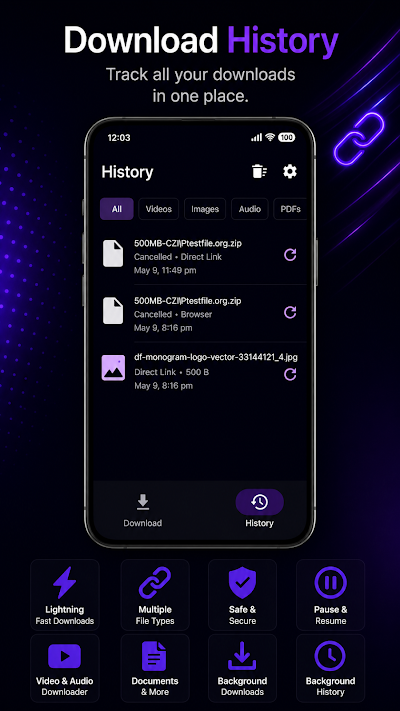
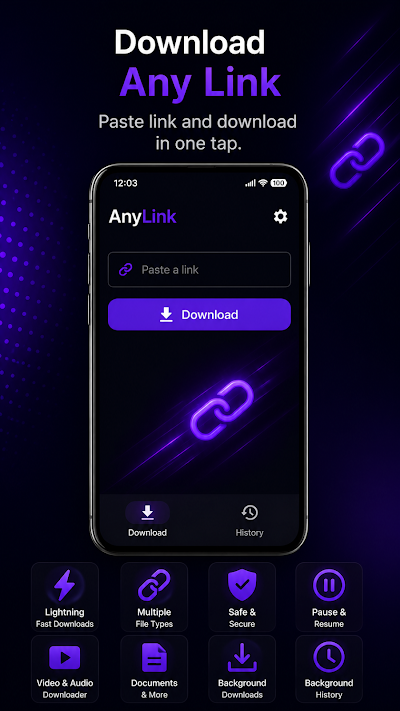
AnyLink screenshot: Download history listing recent downloads, with filters for videos, images, audio and PDFs AnyLink screenshot: AnyLink home screen with a Paste a link field and a Download button

See it in action

What AnyLink does for you

AnyLink screenshot: AnyLink home screen with a Paste a link field and a Download button

Download

Paste. Detect. Download.

Paste a supported link and AnyLink detects the downloadable content for you. It handles direct links and media, and starts the download with one tap.

  • Multi-thread acceleration for fast, stable downloads
  • Works on Wi-Fi and mobile data, with automatic retry for failed downloads

AnyLink screenshot: Download history listing recent downloads, with filters for videos, images, audio and PDFs

Organize

Every download, in one place.

Track active and completed downloads from a single history, filter by type, then open, share or retry a file without hunting through folders.

  • Filters for videos, images, audio and PDFs
  • Pause, resume and queue management with real-time progress

Who it's for

Made for the files you need to keep

Offline viewing

Save videos to watch later, without a connection.

Work documents

Download PDFs and other documents directly from a link.

Large files

Multi-thread downloads, pause and resume, and retry make big files easier to finish.

Organized media

Keep a history and file categories so you can find things again.

Everything included

Features at a glance

Fast download manager

  • Multi-thread download acceleration
  • Background downloading, with pause and resume
  • Automatic retry for failed downloads
  • Download queue and real-time progress
  • Works on Wi-Fi and mobile data

Smart link detection

  • Paste a supported link and AnyLink detects downloadable content
  • Direct link support and media recognition
  • One-tap downloads

Videos, music and files

  • Videos, music and audio, images and photos
  • PDFs and documents
  • APK files and ZIP or RAR archives
  • Large downloadable content

Built-in file management

  • Download history
  • Organized file categories
  • Open, share and manage active and completed downloads

Modern Android experience

  • Clean Material-style interface with a dark theme
  • Lightweight, with smooth animations
  • Battery-conscious design

Screenshots

  • AnyLink screenshot: AnyLink home screen with a Paste a link field and a Download button
  • AnyLink screenshot: Download history listing recent downloads, with filters for videos, images, audio and PDFs

Questions

Frequently asked questions

What can I download with AnyLink?

Videos, music and audio, images and photos, PDFs and documents, APK files, ZIP and RAR archives, and other large downloadable files, directly from a supported link.

Do downloads continue in the background?

Yes. AnyLink supports background downloading, with pause and resume, a download queue and automatic retry for failed downloads.

Can I see what I have already downloaded?

Yes. The built-in history lists your active and completed downloads, so you can open, share or manage them.

AnyLink app icon

Get AnyLink on Android

Download manager for Android with smart link detection.

Download on Google Play

App details

Platform
Android
Category
Tools
Developer
Orixa Studio
Privacy
Privacy Policy
Support
hello@orixastudio.com

More from Orixa Studio

SafetyCam app icon

SafetyCam

Android · Photography

Records video, audio, and photo bursts, then keeps them in an encrypted vault on your device. Every recording starts with a deliberate action.

Details Google Play
Chargify app icon

Chargify

Android · Tools

Tells you when your phone has finished charging with a full-screen alert and alarm, so you can unplug on time. It keeps watching in the background.

Details Google Play
Orixa Studio

We build and maintain our own mobile apps, web products, and developer tools.

Apps

  • All apps
  • SafetyCam
  • AnyLink
  • Chargify

Legal

  • Privacy Policy
  • SafetyCam Privacy
  • Web Scanner Privacy
  • Terms & Conditions
  • Child Safety

Contact

  • hello@orixastudio.com
  • Suggest an Idea

© 2026 Orixa Studio. All rights reserved.

Privacy · Terms · Safety